Importing Your First Strategy
AlgoChef accepts trade history exports from most trading platforms. The import wizard guides you through mapping your data columns to AlgoChef's format. Specific guides are available for NinjaTrader, MetaTrader, and Excel trade journals.
Supported File Formats
| Format | Extensions | Notes |
|---|---|---|
| CSV / TXT | .csv, .txt | Comma, semicolon, tab, or space delimited |
| TradeStation/Multicharts RINA XML | .xml | Native TradeStation performance report export |
| Excel | .xlsx | Spreadsheet trade journals |
| HTML report | .htm, .html | e.g. MetaTrader 4 statement exports |
You can select multiple files at once — the wizard detects each file's format and walks you through a review step per file.
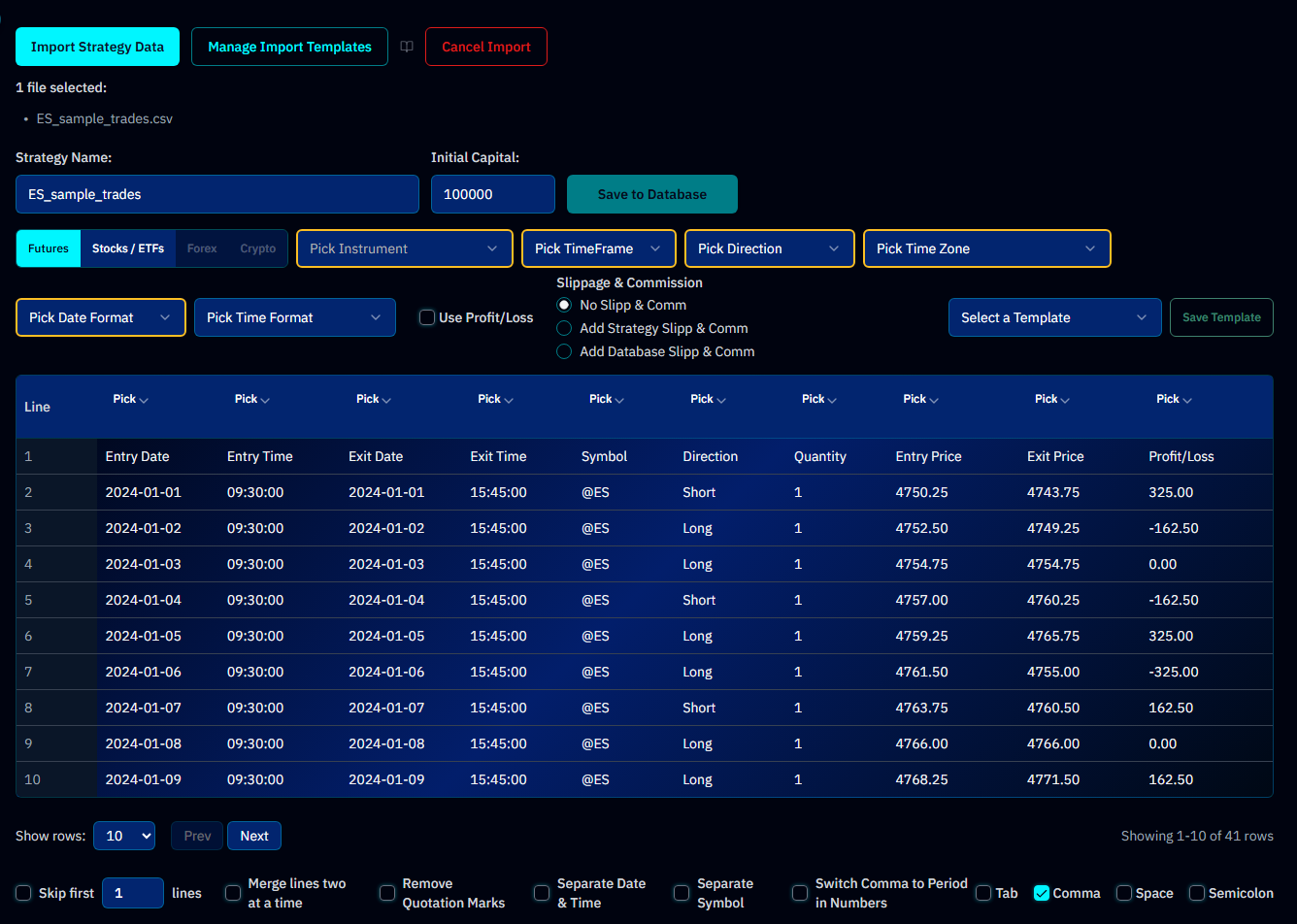
Step-by-Step Import
1. Open Add Strategies
From the app sidebar, open Strategy Hub → Add Strategies, then click Import Strategy Data.
2. Upload Your File
Drag and drop your file(s) onto the upload zone, or click to browse. AlgoChef auto-detects:
- File delimiter (comma, semicolon, tab, space)
- Date format patterns
- Column headers
Parse options let you handle messy files: skip header lines, merge lines, remove quotes, swap comma/decimal separators, and handle separate date/time or symbol columns.
3. Map Your Columns
The import wizard shows your file's columns and asks you to match them to AlgoChef fields. Required fields are:
| Field | Description | Required? |
|---|---|---|
| Entry Date | When the trade was opened | Yes |
| Exit Date | When the trade was closed | Yes |
| Entry Price | The entry price | Yes |
| Exit Price | The exit price | Yes |
| Profit/Loss | The trade result in dollars or points | Recommended |
| Side | Direction — long or short | No (improves analysis) |
| Quantity | Contracts or shares per trade | No (improves analysis) |
Tip
Entry and exit dates and prices are all required — an import without a price column mapped will be rejected. A Net Profit or P&L column is still worth mapping: AlgoChef uses it directly instead of deriving P&L from prices, which avoids any rounding or contract-size mismatch. Adding MAE/MFE columns unlocks the excursion analysis on top.
4. Configure Settings
- Instrument type & instrument — Futures or Stocks / ETFs (Forex and Crypto are listed but not yet selectable); for futures, pick the contract from your Market Database so point-based P&L converts to dollars correctly
- Timeframe and Position type (Long / Short / Both)
- Initial Capital — Starting account balance (used for percentage calculations and CAGR)
- Slippage & Commission — No Slipp & Comm, Add Strategy Slipp & Comm (costs from your file), or Add Database Slipp & Comm (your instrument's stored costs)
- Strategy timezone — Ensures correct date/session handling; time format only needs selecting when your file has entry/exit time columns mapped
These settings reshape every percentage and score in your report — the next lesson, Import Settings That Change Your Numbers, covers how to get each one right.
5. Review & Save
Preview your mapped trades, then click Save to Database. AlgoChef calculates all 200+ metrics, generates equity curves, and scores your strategy. This typically takes a few seconds.
Info
Something look wrong? If metrics seem off, check that your Initial Capital and Commission settings match your actual trading account. These two settings have the biggest impact on percentage-based calculations.
After Import
Your strategy appears in the Strategy Hub with:
- An equity curve sparkline
- CSI score with tier badge
- Quick-access links to the full report, Health Monitor, Monte Carlo, and benchmark comparison
Import Formats & Templates
If you import from the same platform regularly, save your column mapping as a template via Manage Import Templates. Next time, the wizard auto-maps your columns — and batch imports can apply one template across many files.
For detailed format specifications, see:
Tip
Ready to import? Open the Strategy Hub and click Import to get started.
Next lesson
Four settings silently reshape every number in your report — get them right: Import Settings That Change Your Numbers →