Allocation Methods (Allocate Tab)
The Allocate tab in Portfolio Studio answers one question: given this portfolio and this much capital, how many contracts should each strategy trade? It lets you run up to ten allocation methods side by side and compare the results before committing.
These are established portfolio-construction techniques from quantitative finance — explained here in plain language so you can choose confidently.
The Workflow
- Set your capital — any amount from $1,000 to $100M. All methods size in whole contracts, so small accounts may see coarse allocations (you can't trade half a contract).
- Pick methods — check any combination from the three tiers below. Methods with extra parameters expose an inline Advanced Settings disclosure.
- Run Comparison — every selected method is replayed over your portfolio's history.
- Evaluate — the results come in several views:
- Candidate Cards — one card per method, with your current sizes (Original Build) first. Each shows net profit, max drawdown and CSI, a vs Original line with the change in net profit and drawdown, and a small equity sparkline. Expand a card to see its per-strategy breakdown.
- Comparison Table — CSI, Net Profit, drawdown and more per method, side by side.
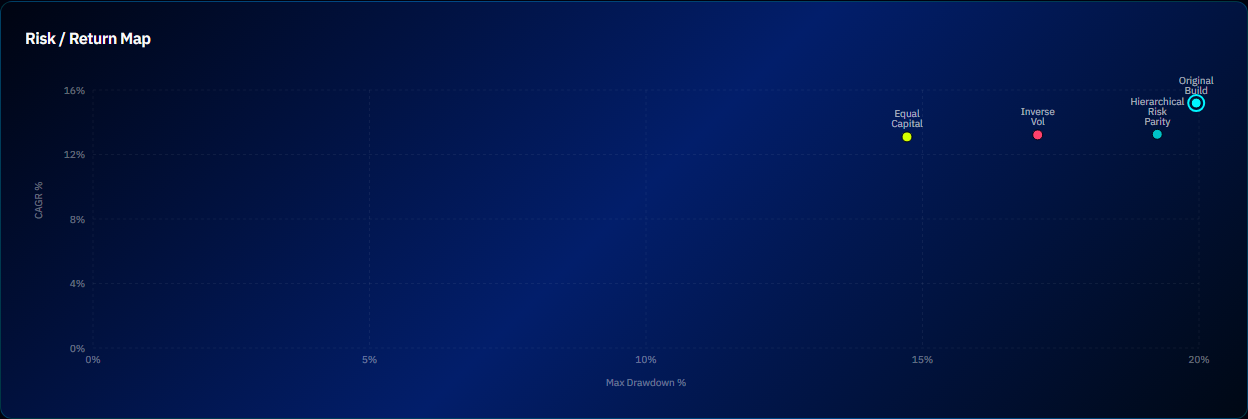
- Risk / Return Map — each method plotted by risk vs return.
- Equity & Drawdown overlay — every method's curve on one chart, with your Original allocation shown for reference.
- Capital Split — one bar per method showing how its capital is divided across your strategies.
- Save as new portfolio — saving a method's result creates a brand-new portfolio under a name you choose. Your current portfolio is not changed.
A rebalance strip at the top shows drift: if your live allocation has wandered from the saved one (because strategies' volatilities changed), it shows Rebalance suggested and offers Apply Rebalance. That is the only control here that changes this portfolio in place: it writes the new contract counts after an Apply rebalance? confirmation, so it is a change to the portfolio, not a preview.
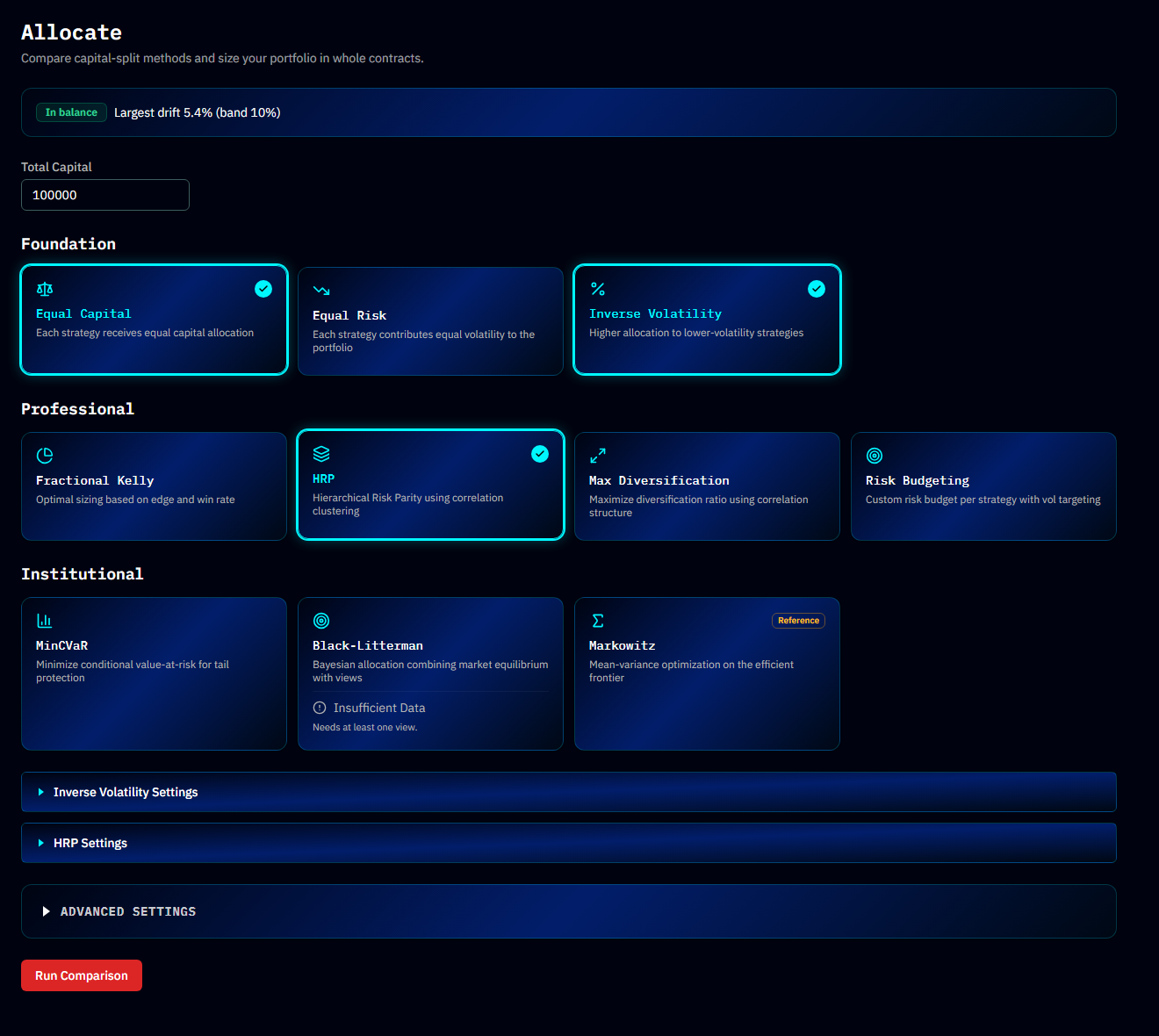
Foundation Methods
Simple, transparent, hard to break. Great defaults.
Equal Capital
Each strategy receives the same dollar allocation. The simplest possible split — a fair baseline every other method must beat.
Equal Risk
Each strategy contributes the same volatility to the portfolio. A wild strategy gets fewer contracts; a calm one gets more. Usually a better default than Equal Capital, because "equal dollars" quietly means "most risk to the most volatile strategy."
Inverse Volatility
Allocates capital inversely proportional to each strategy's volatility. Similar spirit to Equal Risk but computed per-strategy without accounting for correlations.
Professional Methods
Statistically richer — they use each strategy's edge or the correlation structure between strategies.
Fractional Kelly
Sizes positions based on each strategy's historical edge and win rate. Full Kelly maximizes long-run growth but produces brutal drawdowns, so the settings offer fractional presets — Quarter (0.25), Third (0.33), and Half (0.50) — with quarter-to-third generally recommended for live trading.
HRP (Hierarchical Risk Parity)
Uses correlation clustering to build a hierarchical tree of your strategies, then distributes risk across the clusters. Its strength: it doesn't require fragile return forecasts, making it robust when history is noisy.
Quick Build calls this Diversified.
Max Diversification
Maximizes the diversification ratio — the gap between the strategies' summed volatility and the portfolio's actual volatility. It seeks the combination whose parts cancel out the most.
Risk Budgeting
You assign a custom risk budget per strategy (e.g. "core strategy carries 40% of the risk, satellites 15% each") with volatility targeting. Advanced Settings include per-strategy budget controls and an Equal Risk preset as a starting point.
Institutional Methods
The heavy machinery. More powerful, more assumptions.
MinCVaR
Minimizes Conditional Value at Risk — the expected loss in the worst scenarios beyond a chosen confidence level (settings: 90%, 95%, or 99%). Where volatility-based methods treat up and down moves equally, MinCVaR focuses purely on the ugly tail.
Black-Litterman
A Bayesian approach that starts from a market-equilibrium allocation and tilts it by your views ("I expect strategy A to outperform strategy B by X%"), weighted by how confident you are. Requires at least one view to run — without one it just returns the equilibrium allocation. Views are entered in its Advanced Settings.
Markowitz (reference only)
Classic mean-variance optimization on the efficient frontier. Included as a reference because it's the textbook standard, but flagged reference-only: it's notoriously sensitive to input estimates and tends to produce extreme, unstable weights. The app itself will suggest HRP or Black-Litterman for more robust results.
How to Choose
| If you want... | Start with |
|---|---|
| A no-surprises baseline | Equal Capital or Equal Risk |
| Robustness without forecasts | HRP |
| Growth-optimal sizing with guardrails | Fractional Kelly (quarter or third) |
| Explicit control over who carries the risk | Risk Budgeting |
| Protection against tail events specifically | MinCVaR |
| To encode your own market opinions | Black-Litterman |
Tip
You don't have to choose blind — that's the whole point of the tab. Select several methods, Run Comparison, and let the Risk / Return Map show you which trade-off you prefer. Then validate the winner in the Robustness tab before trading it.
Common Questions
Why do two methods give the same allocation? With few strategies or similar volatilities, many methods converge. Differences grow with more strategies and more varied behavior.
Why did my allocation change when nothing changed? Allocations depend on estimated volatilities and correlations, which update as new trades arrive. The rebalance strip flags this drift.
Are the method implementations proprietary? The methods themselves are published, standard techniques. AlgoChef's implementations, defaults, and the scoring used to evaluate results are its own.